Attaching files directly from FileBridge in Outlook 2016

Attaching files directly from FileBridge in Outlook 2016

Problem:

When trying to attach a file located in File Bridge using Outlook 2016 from New Email -> Attachment File, a hyperlink to the file is created and is embedded as a link in the instead of the traditional attachment. 

Cause:

This is caused because MS Outlook 2016 sending attachments as links by default if they are stored in network-accessible locations.

Solution:

  1. Locate the file in File bridge, copy it and paste it directly into the body of your email.

    OR

  2. Start a new email, right-click the toolbar, and click Customize the Ribbon.
    1. Right-click the New Mail Message section on the right
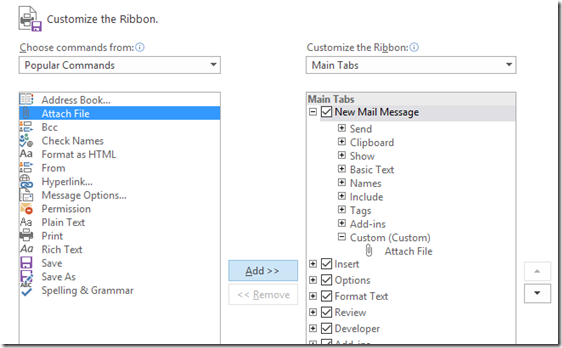
    2. choose Add New group.
    3. Select "Attach File" command on the left, 
    4. Select the new group on the right, and click "Add". The group here is called "Custom"
image
 
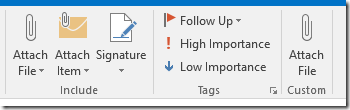
The effect is that you now have two Attach File commands
image
 
The custom "Attach File" is on the right in the image above, and does not have a drop-down list. This is the one you should use.
 
    • Related Articles

    • Attaching a Document in Hosted QuickBooks via FileBridge

      When you use Hosted QuickBooks Desktop through RemoteApp, your local computer and the QuickBooks session run in two separate environments. Because of this, you cannot drag and drop a file from your desktop directly into QuickBooks. This article shows ...
    • How to Optimize FileBridge File Transfers

      Summary While most files in the FileBridge storage location can be moved into and out of it without any additional configurations, sometimes, transferring larger files (Like a Quickbooks QBB Backup, for example), could fail. In this solution, you ...
    • Users do not see the latest Paperless , PDF, or FileBridge files on their computer

      Description Users do not see the latest version of PDF, JPG, or text files when they open the files from FileBridge.  Why does this happen? This happens because the user's computer caches the file on their local computer. When the user tries to ...
    • Cleanup FileBridge Configuration

      Summary: In some instances, the FileBridge client needs to be reinstalled. Performing a simple uninstall from the "Programs and Features" window only removes the FileBridge client, but does not cleanup any associated files and/or configurations. One ...
    • Access Denied when trying to open files from the FileBridge drive

      ISSUE: You recieve an error Access Denied You do not have access to view this file, Would you like to request for permission on Sharpoint? SOLUTION Make sure the FileBridge is mapped, For this example, we will assume it is mapped to drive letter A. ...